E-Pin Ürünleri

Product Name Stock Unit Price Quantity Price Order
3000 Zula Gold 3000 Zula Gold Provides 3,000 “ZA” in the Zula game 101.44 TL 101.44 TL Add to Cart
5850 Zula Gold 5850 Zula Gold Provides 5800 “ZA” in the Zula game 179.82 TL 179.82 TL Add to Cart
16250 Zula Gold 16250 Zula Gold Provides 16250 “ZA” in the Zula game 456.48 TL 456.48 TL Add to Cart
70000 Zula Gold 70000 Zula Gold Provides 70000 “ZA” in the Zula game 1798.24 TL 1798.24 TL Add to Cart
150000 Zula Gold 150000 Zula Gold Provides 150000 “ZA” in the Zula game 3642.59 TL 3642.59 TL Add to Cart
34000 Zula Gold 34000 Zula Gold Provides 34000 “ZA” in the Zula game 912.95 TL 912.95 TL Add to Cart

Zula

What is Zula Online?

Zula Online is a Turkish-made multiplayer online first-person shooter (FPS) game. It was developed by Madbyte Games and offers a competitive experience across various location-based maps. Zula Online is especially popular among Turkish players.

In the game, players are divided into two different teams and compete against each other. Players can choose from different characters, each with unique abilities and weapons. Zula Online features various game modes such as bomb planting, team deathmatch, and hostage rescue.

Players can earn experience points by achieving in-game successes and developing their characters. They can also purchase special equipment and character upgrades through in-game purchases.

Zula Turkey

Basic Information for Playing Zula Online

As Zula Online is an FPS game, its mechanics are generally similar to other first-person shooter games. Here are the basics to help you get started

Create an Account

To start playing, first go to the official Zula Online website and create an account. You usually need an email address and password to register.

Download and Install the Game

After creating an account, download the game client from the official website or another trusted source, and install it on your computer.

Log In

Once you have successfully installed the game, log in with your account details.

Character Selection

After logging in, you need to choose a character. Each character has unique abilities and features. Initially, only a limited number of characters are available, but more can be unlocked as you progress.

Game Modes

Zula Online offers a variety of game modes including team deathmatch, bomb planting, and hostage rescue.

Map Exploration

The game is played on different maps. Exploring maps and learning strategic points is crucial, as each map supports different tactics and playstyles.

Weapons and Equipment Selection

The game features a wide range of weapons and equipment. You can upgrade or change them using in-game currency earned or purchased.

In-Game Communication

Effective communication with your team is vital. Use a microphone or text chat to plan strategies with your teammates.

Achievements and Leveling Up

Earn achievements and perform well in matches to gain experience points, level up, and improve your character.
Zula Online is a competitive game where strategy, teamwork, and aiming skills are crucial. Checking guides and community forums can help you better understand and improve in the game.

Zula Turkey

What are the Zula Online Game Modes?

Team Deathmatch

A classic deathmatch mode between two teams. Each team must reach a certain score by eliminating opponents.

Bomb Planting

In this mode, terrorists try to plant a bomb in a designated area while counter-terrorists try to prevent it. Counter-terrorists can also win by eliminating all terrorists.

Capture the Flag

Each team has a flag, and players attempt to capture the enemy’s flag and bring it back to their base while defending their own.

Special Forces

Players choose characters with unique special abilities, offering a more strategic gameplay experience.

Free For All (Deathmatch)

Every player fights for themselves. The goal is to achieve the highest score by eliminating the most opponents.

Zombie Mode

Players fight against zombies. At the start, one or more players become zombies and attempt to infect others. Survivors must fight back and stay alive.
Each mode offers different strategies and gameplay styles, making the experience varied and rewarding. Players can switch between modes to diversify gameplay and find the one that suits their style best.

Zula Turkey

What are the Zula Online Maps?

Zula Online offers various maps for different game modes. Players strive to gain strategic advantages while battling opponents. Here are some of the maps available in Zula Online

Istanbul

One of the most iconic maps in Zula Online, featuring both street and indoor combat across different modes.

Caspian Border

Usually played in team deathmatch mode, this map covers a large area with open-field battles.

Ankara

Typically used in bomb planting mode, focusing on urban city-center combat.

Paris

Commonly used in capture the flag mode, featuring city-style battles.

Subway

A metro-themed map focusing on close-quarters combat in narrow corridors and subway stations.

Hong Kong

Typically used in team deathmatch mode, offering battles set in a cityscape.

Eskisehir

Usually used in bomb planting mode, featuring battles in a city environment.

Kurban Bayram

A special thematic map often available during events for a limited time.
Zula Online receives updates and additions over time, so map availability may change or expand. Maps enrich the game by allowing players to try different strategies and enjoy varied experiences.

Zula Gold

What is Zula Gold (ZA) and What is it Used For?

Zula Gold is a virtual currency used in Zula Online. It is used to purchase various items, upgrade equipment, and trade with other players. Zula Gold offers players more customization and development options in-game.

Ways to Obtain Zula Gold

In-Game Achievements and Quests: Completing quests or achieving certain milestones can earn you Zula Gold.

Tournaments and Events: Official tournaments and special events often reward players with Zula Gold.

In-Game Purchases: Zula Gold can also be purchased with real money in different packages through the in-game store.

Competitive and Ranking System: Performing well in ranked matches and climbing the ranking ladder can also grant Zula Gold rewards.

Zula Gold gives players more flexibility in in-game purchases. Players can buy various items and make their characters stronger. However, since virtual currencies usually require real money, spending should be done wisely.

Zula upgrade system

What is the Zula Upgrade (+) System?

In Zula Online, the "Upgrade System" is typically used to enhance and strengthen the stats of equipment such as weapons and armor. This system allows players to improve their gear in-game.

Essentially, the upgrade system increases the level of a chosen item, granting players advantages. However, the process involves risks and may not always succeed.

Here’s how the Upgrade System generally works

Equipment Selection: First, select the item you want to upgrade (weapons, armor, or other character gear).

Gather Materials: You may need to collect specific materials for the upgrade. These materials can be obtained through quests or events.

Access the Upgrade Interface: Enter a special in-game interface or NPC to perform the upgrade process.

Upgrade Process: Use the required materials in the interface to attempt the upgrade. Success is usually based on probability.

Success or Failure: If successful, the item’s level increases and becomes stronger. If it fails, the item may lose levels or even take damage.

The upgrade system offers players the chance to acquire stronger equipment while also carrying certain risks. Players must carefully manage materials and decide how much risk they are willing to take.

Information

The reviews in this area are real evaluation comments made by real users who have purchased these products.

Yükleniyor animasyon
  • Hipopotamya Logo

    S**** K**** 19-09-2024, 05:15 (1 year ago)

    Purchased 3000 Zula Gold

    Her oyunda hızlı ve başarılı <3

  • Hipopotamya Logo

    H**** S**** 10-04-2024, 18:00 (2 years ago)

    Purchased 70000 Zula Gold

  • Hipopotamya Logo

    H**** S**** 21-03-2024, 21:39 (2 years ago)

    Purchased 70000 Zula Gold

  • Hipopotamya Logo

    H**** S**** 16-03-2024, 14:49 (2 years ago)

    Purchased 5850 Zula Gold

  • Hipopotamya Logo

    H**** S**** 16-03-2024, 14:48 (2 years ago)

    Purchased 16250 Zula Gold

  • Hipopotamya Logo

    H**** S**** 14-03-2024, 13:43 (2 years ago)

    Purchased 3000 Zula Gold

  • Hipopotamya Logo

    H**** S**** 14-03-2024, 13:39 (2 years ago)

    Purchased 16250 Zula Gold

  • Hipopotamya Logo

    Y**** G**** 01-03-2024, 20:33 (2 years ago)

    Purchased 16250 Zula Gold

    Adam daha ne yapsın bedavaya kod dağıtıyor, 7/24 canlı destek var ,herkese kesnilkle tavsiye ediyorum İnternetteki abuk subuk sitelere benzemez burası. Forever Hipopotamya !

🥇 What is Zula Gold (ZA) & How to Redeem It?

Zula Gold (ZA) used in Zula Online is the official in-game currency that allows you to obtain character cases, special skins, knives, legendary weapons, and Zula Pass privileges.

🛒 1) Purchasing Zula Gold via Hipopotamya.Com

  • After logging into your account on Hipopotamya.Com, type "Zula Gold" or "ZA" in the search bar to go to the relevant category.
  • Select the amount of Zula Gold (ZA) you wish to top up, add it to your cart, and complete your payment.
  • Once your order is confirmed, your Zula E-Pin code will be delivered instantly under the My Account → My Orders tab.
  • Stock Status Warning: If stock is temporarily unavailable on our site, you can turn on stock notifications or top up directly via official Zula channels.

🎮 2) Zula Gold (ZA) Top-Up Steps via Official Zula Online Website

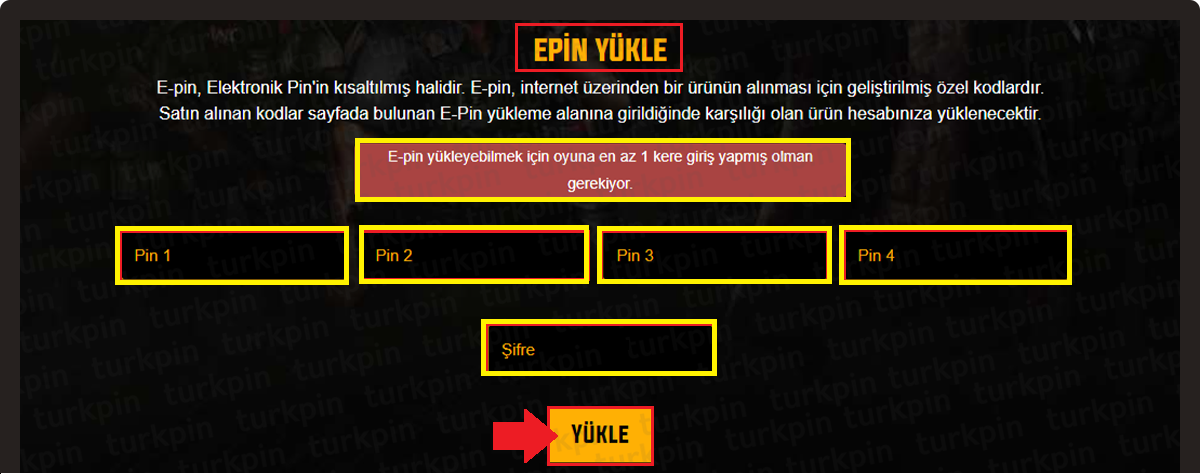
1) Go to the official Zula Online website and log in to your game account with your user credentials.

2) Click on the "TOP UP ZA (ZULA GOLD)" or "Top Up Gold" button located in the main menu.

3) To use the E-Pin code you purchased from Hipopotamya.Com, select the E-Pin payment option and enter your code carefully and completely.

4) After entering the code, click the "TOP UP & COMPLETE" button; your transaction will be confirmed and your ZA balance will be credited to your account instantly.

Zula Gold Top-Up Screen

Additional Top-Up Options (Direct Purchase):

You can also purchase ZA directly through the website using your payment details by selecting different payment methods such as Credit Card, Debit Card, Mobile Payment, or Wire Transfer/EFT, and choosing your desired gold package.

IMPORTANT WARNING
• It is recommended to use the copy-paste method when entering your E-Pin code to avoid typos.
• Current payment methods, package contents, and top-up steps for Zula Online may change over time.
• It is recommended to always follow the official Zula Online website and announcements for the most up-to-date and accurate payment options.

💻 Zula Online System Requirements

Component Minimum / Recommended Requirements
Operating System Windows 7 / 8 / 10 / 11 (64-bit)
Processor (CPU) Dual Core 2.4 GHz / Intel Core i3
Memory (RAM) 4 GB RAM
Graphics Card (GPU) Intel HD Graphics 4000 / GeForce GT 730
Storage 15 GB available space

❓ Frequently Asked Questions

Q: Where can I find the Zula Gold E-Pin code I purchased?

A: Once your payment is approved, your code is instantly displayed under the My Account → My Orders tab on Hipopotamya.Com.

Q: How long does it take for my loaded ZA to reflect in my account?

A: After successfully redeeming your E-Pin code on the official Zula website, your ZA balance is instantly transferred to your game account.