



Silkroad Online phBot 52 Weeks

 WHAT IS SILKROAD ONLINE PHBOT?
Silkroad Online phBot duration packages from 1 to 32 weeks, 24/7 instant automated E-Pin delivery, and competitive prices are available at Hipopotamya.com.
What is Silkroad Online phBot and Why Choose It?
phBot is the most popular, stable, and advanced automated grinding software developed for Silkroad Online players. It operates with full compatibility across TRSRO, iSRO, vSRO, and all Private servers. Even when you are away from your computer, it ensures your character seamlessly continues leveling up, collecting loot, and managing trade activities.
Thanks to its user-friendly interface and lightweight architecture that consumes minimal system resources, you can run multiple characters (Multi-Client) simultaneously without straining your computer.
- ⚡ Uninterrupted Auto-Grinding: Automatically maintains your character's XP, Gold, and item farming 24/7.
- 🖥️ Advanced Multi-Client Support: Allows managing multiple accounts on a single PC with low RAM and CPU consumption.
- 🌐 Full Compatibility Across All Servers: Operates seamlessly on TRSRO, Official Global (iSRO), and all vSRO Private servers.
phBot Duration Packages & Instant Automated Delivery
Select from 1-Week, 2-Week, 4-Week (1 Month), 8-Week, 16-Week, and 32-Week phBot E-Pin packages tailored to your needs to extend your existing account's duration or create a brand-new bot account.
- 🚀 24/7 Automated E-Pin Delivery: Receive your E-Pin (Card ID & Card Password) keys instantly following checkout.
- ⏳ Flexible Options: Choose between short-term trial options or long-term cost-effective duration packages.
- 🔄 Easy Activation: Redeem your codes directly into your account via the official phBot activation panel.
How to Redeem Your phBot E-Pin Code?
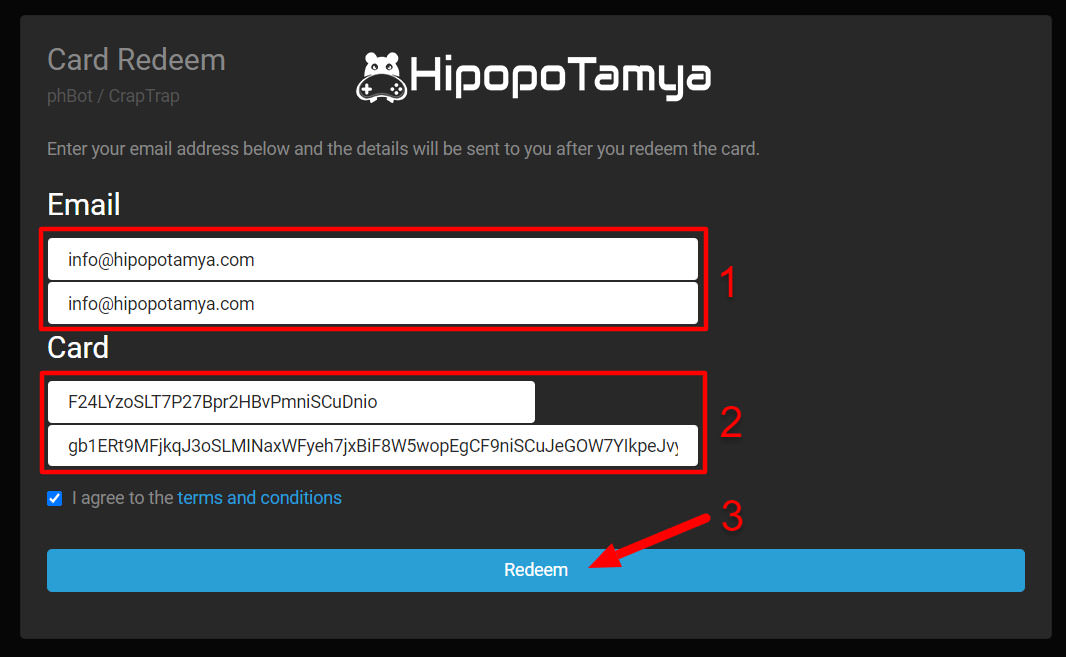
To activate your purchased phBot E-Pin codes, simply visit phbot.org/phbot/redeem/:
- 🆕 For New Accounts: Enter an unused email address into the "Email" field to register a new account. Login details will be sent directly to your email.
- ⏱️ To Extend Duration: Enter the email address linked to your existing phBot account into the "Email" field.
- 🔑 Code Confirmation: Enter the Card ID and Card Password provided to you into their respective fields, then click "Redeem" to complete activation.


Activation questions
Does this code add Silk to my game account?
No. phBot licence time and Silkroad in-game currency are different products.
What if the redemption page does not open?
Check the link in the official phBot guide again. If the page is unavailable, do not enter your details on alternative websites; contact official support or Hipopotamya support before proceeding.
24/7 live support
Use our website’s live support area for order and card information questions.
Information
The reviews in this area are real evaluation comments made by real users who have purchased these products.











I'm Sorry!
Be the first to review!