E-Pin Ürünleri

Product Name Stock Unit Price Quantity Price Order
Nintendo 20 USD Gift Card Nintendo 20 USD Gift Card Delivered as a digital code. Can only be activated in the US region. 467.86 TL 467.86 TL Add to Cart
Nintendo 20 USD Gift Card Nintendo 20 USD Gift Card Delivered as a digital code. Can only be activated in the US region. 951.58 TL 951.58 TL Add to Cart
Nintendo 35 USD Gift Card Nintendo 35 USD Gift Card Delivered as a digital code. Can only be activated in the US region. 1638.84 TL 1638.84 TL Add to Cart
Nintendo 50 USD Gift Card Nintendo 50 USD Gift Card Delivered as a digital code. Can only be activated in the US region. 2339.32 TL 2339.32 TL Add to Cart

Nintendo eShop

Nintendo eShop USA Gift Cards

Browse USD Nintendo eShop cards listed for the United States. Current products specify US redemption; do not assume compatibility with another country’s account. On Hipopotamya, check the USD denomination, region and delivery type to choose a suitable option.

USA store compatibility

Verify your Nintendo Account’s US country setting and store currency. An English console interface or being physically in the US does not by itself determine the account’s store country.

Select games and DLC

Use credit to select eligible digital store content. Before buying an add-on, check the required base game, console model and content compatibility.

USD versus EUR

Distinguish the USD card value from its selling price. USA and EU products have different region and currency requirements; do not expect automatic conversion to another store’s currency.

Redeem your code

Products are delivered as digital codes. Open eShop on Switch or Switch 2, choose the correct Nintendo Account and enter the code through the redemption area, checking the value before confirmation.

Read the conditions first

Review the USA region requirement and USD value. Do not rely on outdated promises of new 3DS or Wii U store purchases. Check the account before confirming to avoid redeeming on the wrong one.

Nintendo USA card frequently asked questions

Is a USA card the same as another region’s card?

No. A USD product listed for the US is not the same code as a European euro product. Choose the region compatible with your account.

Does the code include Nintendo Switch Online?

A balance card does not automatically include membership. For a subscription purchase, check the available plan and payment conditions separately.

Can I use the generic web code redemption page?

Redeem balance cards through eShop on your console. A generic website download-code page may not accept every wallet card; follow the product’s specific instructions.

Explore the Nintendo category

24/7 live support

For region and product selection or order questions, contact us through the website’s live support area. Never share your Nintendo Account password.

Information

The reviews in this area are real evaluation comments made by real users who have purchased these products.

Yükleniyor animasyon

I'm Sorry!

Be the first to review!

How to redeem a Nintendo eShop card

Use the intended Nintendo account in a supported marketplace. Check the country and currency before entering a code.

Official source and support ↗

Check account and card region

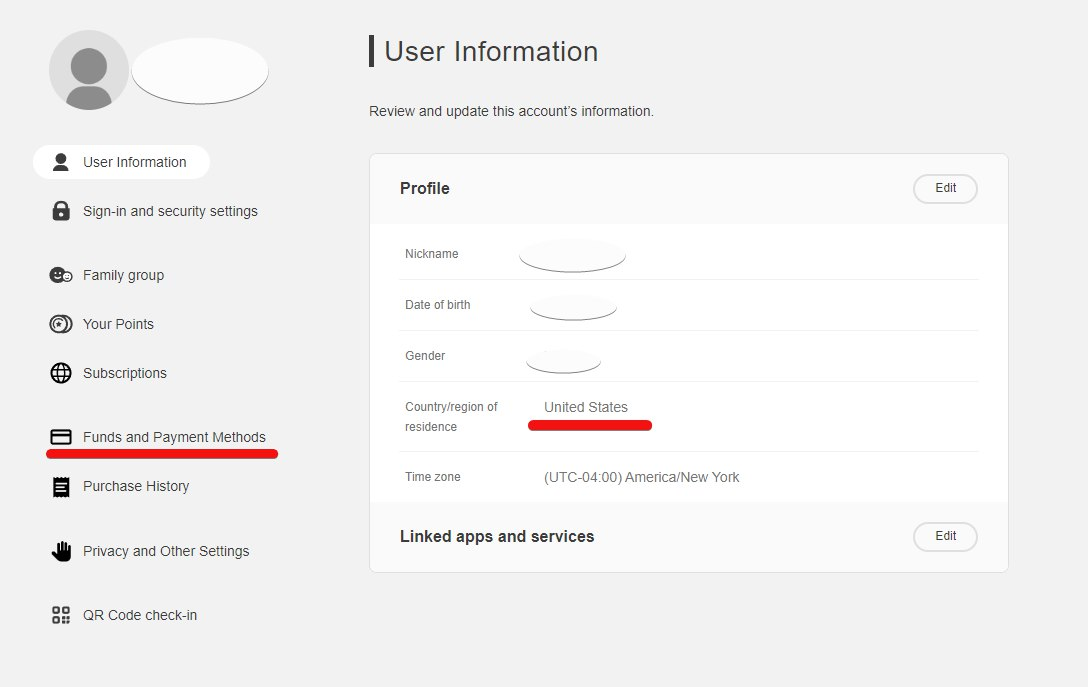
Retrieve your code and match the account country to the card marketplace; USD and EUR cards are not interchangeable. In supported regions, sign in to the Nintendo Account portal and open Funds and Payment Methods. The source screenshot below shows a US account, not evidence of Turkish eShop availability.

Nintendo account country and payment menu
Source web screenshot: US account example; country and menus may differ.

Open Nintendo eShop

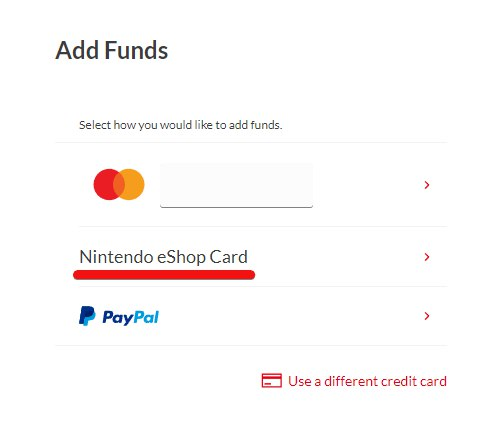
On Switch or Switch 2, open Nintendo eShop, select the intended user and choose Redeem Code. Alternatively, on the web use Funds and Payment Methods → Add funds, confirm your password if requested and choose Nintendo eShop Card. Availability depends on the account region.

Nintendo eShop Card add-funds option
Source web screenshot: choose Nintendo eShop Card. The current signed-in form was not independently verified.

Enter and confirm

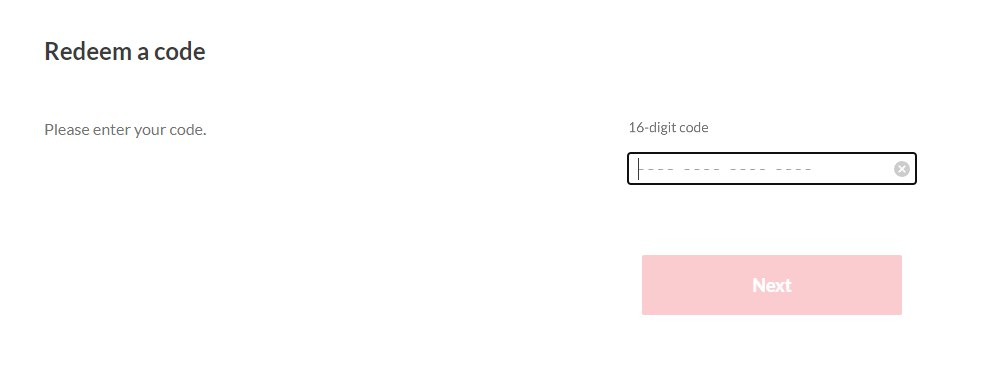
Enter the 16-character card code. On the console, select OK → Confirm → Add Funds; on the web continue to review the details and confirm Add funds. Wallet cards and software download codes are different. Check the credited balance, then purchase your chosen game separately.

Nintendo 16-character code entry field
Source web code screen; enter your own code in the empty field and review the subsequent confirmation.

Redemption questions

Code not accepted?

Check the account, region and code type. Contact support with your order number and error message without posting the code publicly; do not pay again.

HipopotamyaExplore gift cardsCheck region, card type and redemption conditions.

24/7 live support

Use our website’s live support area for order and code questions.

Hipopotamya