Metin2 300 Ejder Parası E-Pin
Metin2 Dragon Coins (EP) Top-Up Guide
You can follow the steps below to redeem the Metin2 EP E-Pin code purchased on Hipopotamya.com to your account.
💳 Redeeming Metin2 EP E-Pin Code in Item Shop
Copy your Metin2 Dragon Coins (EP) E-Pin code purchased from the orders page on Hipopotamya.com.
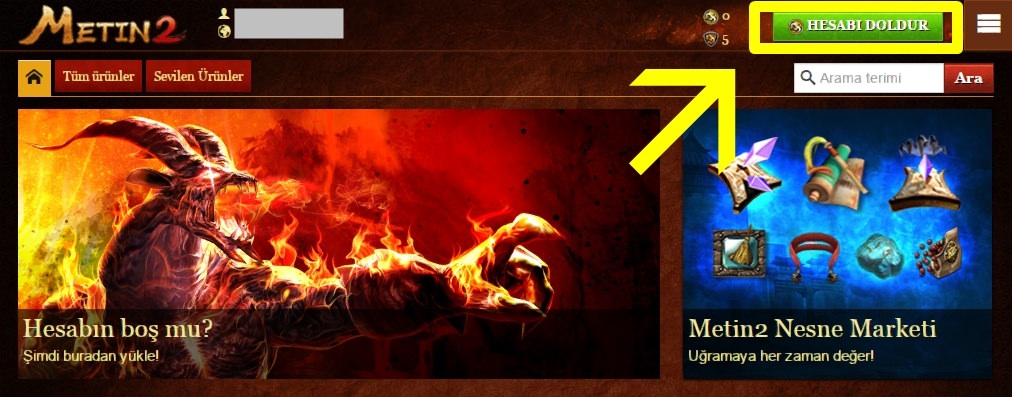
Log in to Metin2. Click on the spinning gold coin icon (Item Shop) at the bottom left of the screen and press the "Top Up Account" button in the opened window.
Click on the "Redeem Coupon" option on the payment options page that opens.
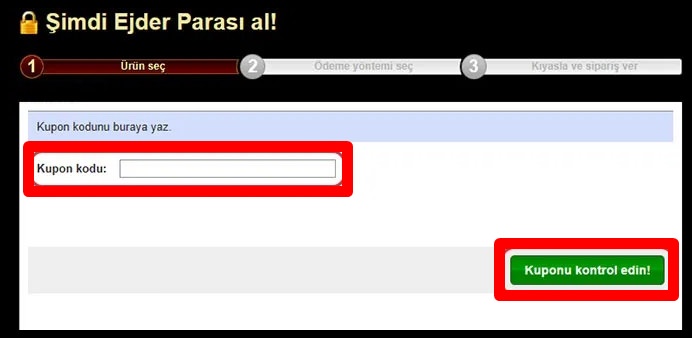
Paste your copied E-Pin code into the box. Complete the transaction by first clicking the "Check Coupon" button and then the confirmation option. Your Dragon Coins will be credited to your account instantly.
Make sure there are no leading or trailing spaces when entering the E-Pin code. Depending on server load, it may take 1-2 minutes for Dragon Coins (EP) to reflect on your profile. For support, you can reach out to our 24/7 Hipopotamya Live Support line.
💻 Metin2 PC System Requirements
❓ Frequently Asked Questions
Q: What are Metin2 Dragon Coins (EP) used for?
A: EP allows you to purchase items from the Item Shop that accelerate your character progression, such as Experience Rings, Thief's Gloves, Pass Tickets, Auto-Hunt, costumes, mounts, and pets.
Q: Can I use the Metin2 EP E-Pin code in another game?
A: No, these E-Pin codes are only valid for topping up Dragon Coins on the Gameforge Metin2 Item Shop.
Information
The reviews in this area are real evaluation comments made by real users who have purchased these products.



I'm Sorry!
Be the first to review!