
E-Pin Ürünleri

Product Name Stock Unit Price Quantity Price Order
Metin2 300 Ejder Parası E-Pin Metin2 300 Ejder Parası E-Pin Metin2 300 Ejder Parası E-pin Kodu Olarak Teslim Edilir. 116.93 TL 116.93 TL Add to Cart
Metin2 750 Ejder Parası E-Pin Metin2 750 Ejder Parası E-Pin Metin2 750 Ejder Parası E-pin Kodu Olarak Teslim Edilir. 243.60 TL 243.60 TL Add to Cart
Metin2 1750 Ejder Parası E-Pin Metin2 1750 Ejder Parası E-Pin Metin2 1750 Ejder Parası E-pin Kodu Olarak Teslim Edilir. 487.19 TL 487.19 TL Add to Cart
Metin2 4800 Ejder Parası E-Pin Metin2 4800 Ejder Parası E-Pin Metin2 4800 Ejder Parası E-pin Kodu Olarak Teslim Edilir. 1169.26 TL 1169.26 TL Add to Cart
Metin2 11250 Ejder Parası E-Pin Metin2 11250 Ejder Parası E-Pin Metin2 11250 Ejder Parası E-pin Kodu Olarak Teslim Edilir. 2435.95 TL 2435.95 TL Add to Cart

Metin2

Metin2 Dragon Coins: Explore EP Packages and the Game World

Develop your character, explore dungeons and create your own adventure in Gameforge’s Metin2. Hipopotamya’s Metin2 category contains Dragon Coin e-pin products for the Turkish service, listed as Ejder Parası (EP). Compare package amounts, current prices and availability, and check currency use and account compatibility before choosing.

What is Metin2?

Metin2 is a fantasy MMORPG developed by WEBZEN and published by Gameforge. Choose the Shinsoo, Chunjo or Jinno kingdom and progress through quests, monster battles, dungeons and player competition. Equipment upgrades and guild cooperation are also important parts of the adventure.

What are Dragon Coins used for?

Dragon Coins, called Ejder Parası (EP) in Turkish, are used to purchase eligible paid content in the Metin2 Item Shop. Options may include experience and item-drop boosts, costumes, mounts, pets and passage tickets. Check the current shop descriptions for availability, duration and usage requirements.

Dragon Coins, Yang and Dragon Marks differ

Yang is used for in-game purchases and trading, while Dragon Coins are an Item Shop balance. Dragon Marks are another separate shop currency. These products are not Yang purchases. Check which balance your chosen item requires; do not assume the currencies are interchangeable.

Choose an e-pin for your account

These products are listed as EP e-pins for Gameforge’s Turkish Metin2 service. Do not confuse them with private-server credit or a card valid in every Gameforge game. Verify the region and account type. If you play through Steam, ask support about compatibility rather than assuming these codes will work.

Metin2 classes and gameplay

  • Character classes: Warrior, Ninja, Sura, Shaman and Lycan offer different skills and combat styles. Choose according to your preferred play style.
  • Metin Stones and dungeons: Metin Stones are targets you attack and destroy while fighting monsters. Check the current game guide for dungeon entry requirements.
  • Guilds and equipment progression: Form groups, take part in guild activities and improve your equipment. Required materials and success conditions depend on the system. No purchase guarantees a successful upgrade or victory.

What should you check before buying Metin2 EP?

First check your chosen item’s current Dragon Coin price and your existing balance in the Item Shop. Then compare package amounts, prices, availability and delivery details. Distinguish timed items from permanent content, and direct purchases from random-reward chests. Receiving an e-pin does not automatically add credit to your game account. Follow your selected product’s current redemption instructions.

Frequently asked questions about Metin2 Dragon Coins

Do I need to buy Dragon Coins to play Metin2?

No. Gameforge’s Metin2 is free to play. Dragon Coins are a paid balance for eligible Item Shop content, not a requirement to start the game.

Can an EP e-pin be used on a private Metin2 server?

No. These products are for Gameforge’s official Metin2 service. Private servers have their own shops and credit systems.

Does my account receive Dragon Coins when the code is delivered?

Code delivery and account redemption are separate steps. Redeem the e-pin with the appropriate game account through the official top-up area specified in your product’s instructions. Never share your password or code publicly.

24/7 live support

For questions about an EP package, account compatibility or a delivered code, contact our team through the live support area on our website.

Information

The reviews in this area are real evaluation comments made by real users who have purchased these products.

Yükleniyor animasyon
  • Hipopotamya Logo

    A**** Ç**** 14-12-2024, 20:12 (1 year ago)

    Purchased Metin2 450 Ejder Parası (90 Liralık Kupon)

    teşekkürler

  • Hipopotamya Logo

    A**** Ç**** 13-11-2024, 14:00 (1 year ago)

    Purchased Metin2 1275 Ejder Parası (225 Liralık Kupon)

    teşekkürler

  • Hipopotamya Logo

    A**** Ç**** 03-11-2024, 03:18 (2 years ago)

    Purchased Metin2 1275 Ejder Parası (225 Liralık Kupon)

    Hızlı teslim için teşekkür ederim

  • Hipopotamya Logo

    A**** Ç**** 20-10-2024, 13:17 (2 years ago)

    Purchased Metin2 60 Ejder Parası (18 Liralık Kupon)

    teşekkürler

  • Hipopotamya Logo

    A**** Ç**** 20-10-2024, 13:15 (2 years ago)

    Purchased Metin2 60 Ejder Parası (18 Liralık Kupon)

    eyv

  • Hipopotamya Logo

    A**** Ç**** 20-10-2024, 13:12 (2 years ago)

    Purchased Metin2 3000 Ejder Parası (450 Liralık Kupon)

    Teşekkürler

  • Hipopotamya Logo

    S**** K**** 15-10-2024, 04:54 (2 years ago)

    Purchased Metin2 60 Ejder Parası (18 Liralık Kupon)

  • Hipopotamya Logo

    S**** K**** 06-10-2024, 03:44 (2 years ago)

    Purchased Metin2 60 Ejder Parası (18 Liralık Kupon)

How to redeem Metin2 Dragon Coins (EP)

Redeem your Metin2 EP voucher through the Item Shop of the intended game account. One Gameforge login may contain several game accounts.

Official source and support ↗

Check the product and code

Retrieve the code from Hipopotamya My Orders. Compare its Metin2 EP / Gameforge voucher, country and currency details with the product page.

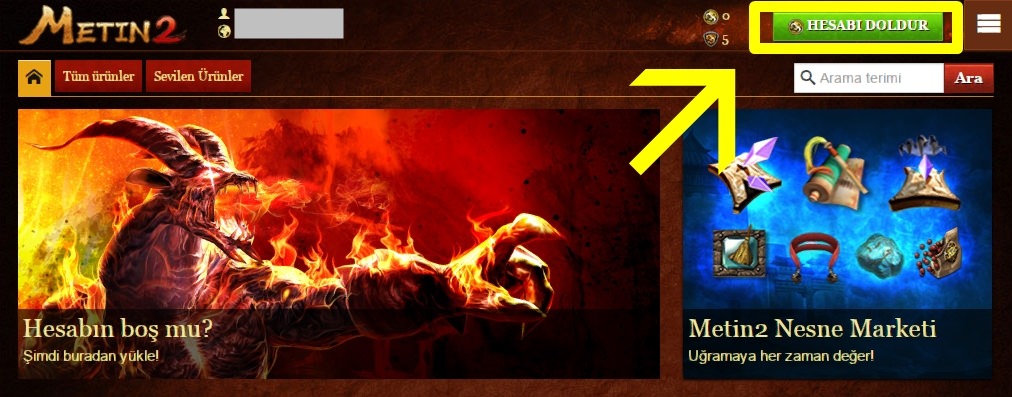
Open the correct account’s Item Shop

Select the intended Metin2 game account in the Gameforge client and enter the Item Shop. Open the top-up section; signing in to Gameforge alone does not verify the target game account.

Example Metin2 Item Shop top-up screen
Item Shop example; check the intended game account before opening the top-up section.

Check and use the voucher option

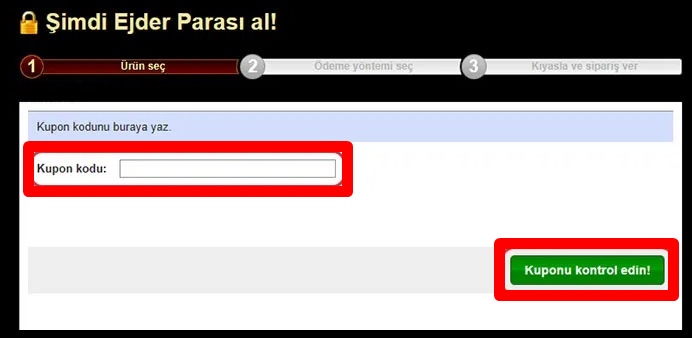
If Redeem Coupon / Gameforge Coupon appears in the payment menu, enter the code there. Review the account and EP shown before confirming. Codes for other providers require their own product instructions.

Example Metin2 EP voucher entry screen
Example voucher field. Use your own delivered code, not the illustrated value; verify the account and EP before confirming.

Review the result

Check the credited EP. Save any error message and your order number. If the voucher option is missing, do not enter the code into unrelated event or client activation forms; contact support.

EP questions

Why might the code be rejected?

Check the region, provider, game account and missing characters against the product details and error message.

Will the voucher screen always look the same?

Menus and providers can change. Follow the current official payment screen; if the option is unavailable, contact support before proceeding.

HipopotamyaBrowse Metin2 productsDistinguish EP from other game products.

24/7 live support

Use our website’s live support area for order and code questions.

Hipopotamya