



Silkroad Online phBot 16 Week

Silkroad Online phBot 16 Week
Silkroad Online PHBot extension packages can be used on a new account or to extend the duration of your existing account. The E-Pin codes you purchase are automatically delivered 24/7.
By purchasing Silkroad Online phBot 16 Week, you can reach your goals in the shortest time. With the 16 Week phBot, even when you are not at your computer, you can have your character continue playing the game, kill monsters, collect dropped items, and level up in Silkroad Online.
How to Open Account and Load Duration with phBot E-pin?
First, visit the phBot E-pin loading page via the link on the right: phbot.org/phbot/redeem/
To Create a New Account:
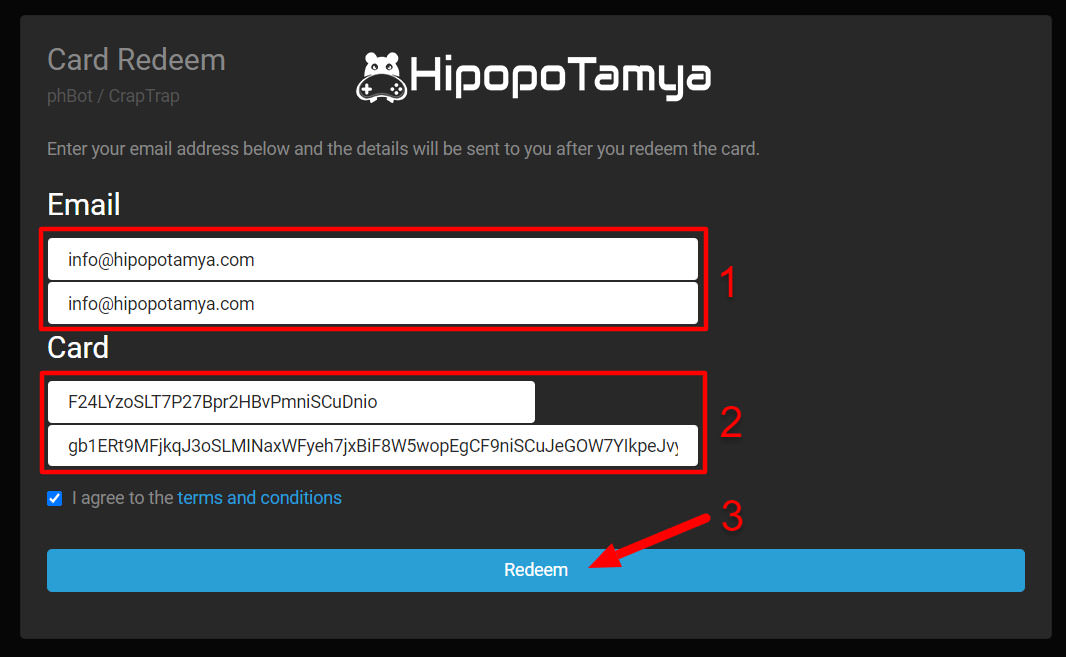
Enter your unused email address in the "Email" field on the phBot website. This will send the username and password for the new bot account to the email address you provided.
To Extend Time on an Existing Account:
Enter the email address of the phBot account you want to extend in the "Email" field.
After entering the phBot E-pin code (short version) in the "Card ID" field and the E-pin password (long version) in the "Card password" field, click the "Redeem" button at the bottom. Once the E-pin code is validated, the login information for the extended account or the newly created phBot account will be sent to the email address you provided above. You can then log in using this account information and start using it.
🤖 SILKROAD ONLINE phBOT E-PIN USAGE GUIDE
With the phBot E-Pin codes purchased on Hipopotamya.com, you can create a new account or instantly extend your existing account's duration 24/7.
⚙️ Determine Your Intended Use
✨ To Create a New Account
In the "Email" field, enter an email address that has not been previously used in the phBot system. The username and password for the created bot account will be sent to this email address.
⏳ To Extend an Existing Account
In the "Email" field, enter the email address registered to the phBot account whose duration you wish to extend.
📌 Step-by-Step E-Pin Activation Guide
Go to the phBot E-Pin Page
Open phbot.org/phbot/redeem/ in your browser.
Enter Your Email Address
In the "Email" section, enter your new email if you are creating a new account, or your existing phBot email if you are extending duration.
Enter Your E-Pin Codes
Paste the short E-Pin code obtained from Hipopotamya.com → My Orders into the "Card ID" field, and the long E-Pin password into the "Card password" field.
Click the Redeem Button
Click the "Redeem" button at the bottom to complete the process. Once the code is verified, your login credentials will be sent to your email address.
✨ You can activate your phBot E-Pin codes right away at phbot.org/phbot/redeem/ and start enjoying your bot!
Information
The reviews in this area are real evaluation comments made by real users who have purchased these products.













E **** F **** 05-09-2026, 13:27 (2 weeks ago)
adamın hası
B **** G **** 01-11-2024, 23:03 (1 year ago)
hızlı :)
Y **** Y **** 21-10-2024, 23:54 (1 year ago)
çok iyi hızlı güzelsiniz
S **** Ş **** 07-10-2024, 23:10 (1 year ago)
güzelll
U **** B **** 18-09-2024, 12:15 (2 years ago)
Teşekkürler !
D **** Y **** 22-08-2024, 00:51 (2 years ago)
baya hızlı ve güvenli
S **** Ş **** 26-02-2024, 16:20 (2 years ago)
çok iyi
Y **** Y **** 27-01-2024, 19:11 (2 years ago)
teşekkürler hızlı